 Wine-Plus
Speech
- Installed SAPI 5 voices can be selected and used.
- Voices such as ScanSoft RealSpeak no longer crash when speaking.
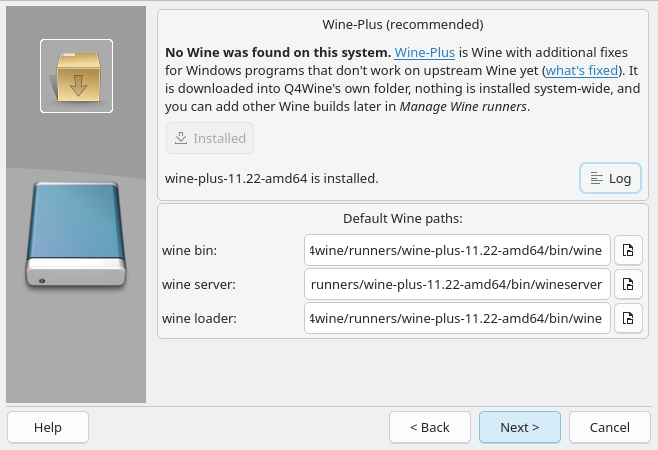
Wine-Plus is upstream Wine plus fixes for desktop programs that fail on it today. Q4Wine-Plus, its program manager, downloads it for you on first start, similar to how Steam sets up Proton. You don't need to install Wine first.
x86_64 Linux with glibc 2.35 or newer: Debian 12, Ubuntu 22.04, Fedora 36 and newer.
On Debian and Ubuntu:
sudo apt install ./q4wine-plus_version_amd64.debElsewhere, unpack the portable tarball and run ./q4wine
(./install.sh adds a menu entry).
The first start wizard fetches the newest Wine-Plus into Q4Wine-Plus's own folder and makes it your default Wine. Nothing is installed system-wide.
Create a prefix, run the installer, and launch the program from its launcher. New Wine-Plus releases show up in Prefixes → Manage Wine runners.
Prefer the command line? q4wine-ctl runner install wine-plus --default does the same.
Wine-Plus also works without Q4Wine-Plus: download the
runner tarball and run its bin/wine,
or add the index https://raw.githubusercontent.com/Wine-Plus/wine/repo/ to any
launcher that reads Bottles-style runner repositories.
Every fix starts with a program that fails. It is traced to the Wine component at fault and fixed there, with a conformance test, so every program using that component benefits. In the current release, plus-11.22:
Folder::GetDetailsOf() is implemented (64-bit XYplorer starts).&HFFFFFF00 and yyyyy date formats
convert correctly (64-bit XYplorer starts, and its Tools menu works).elscore.dll start.An extended Q4Wine with the same compact
interface, plus a full command line tool, q4wine-ctl. Existing Q4Wine
settings and prefixes keep working.
Wine-Plus is developed with the help of AI coding assistants. That's what makes it possible to fix programs in days instead of release cycles.
WineHQ doesn't accept AI-assisted code, so these fixes can't be submitted upstream and Wine-Plus is a separate project, not affiliated with WineHQ. Each new Wine release is rebuilt with the Wine-Plus fixes on top, and a fix is dropped once upstream solves the same problem.
Please report Wine-Plus problems on our GitHub, not to WineHQ.
The most useful thing you can do: tell us which Windows program doesn't work. Open an issue with the program, what goes wrong, and a log if you have one.
Pull requests are welcome, including AI-assisted ones. Please include a conformance test and a changelog entry, and be ready to explain your change. See the contributing notes.